



Cutria
Log in

Write the script. Your editor gets the timeline.

Cutria turns a video idea into a scene-by-scene plan with durations, assets and checklists — and hands it to your editor as a timeline that opens in DaVinci Resolve, Premiere Pro or Final Cut.

No credit card required.

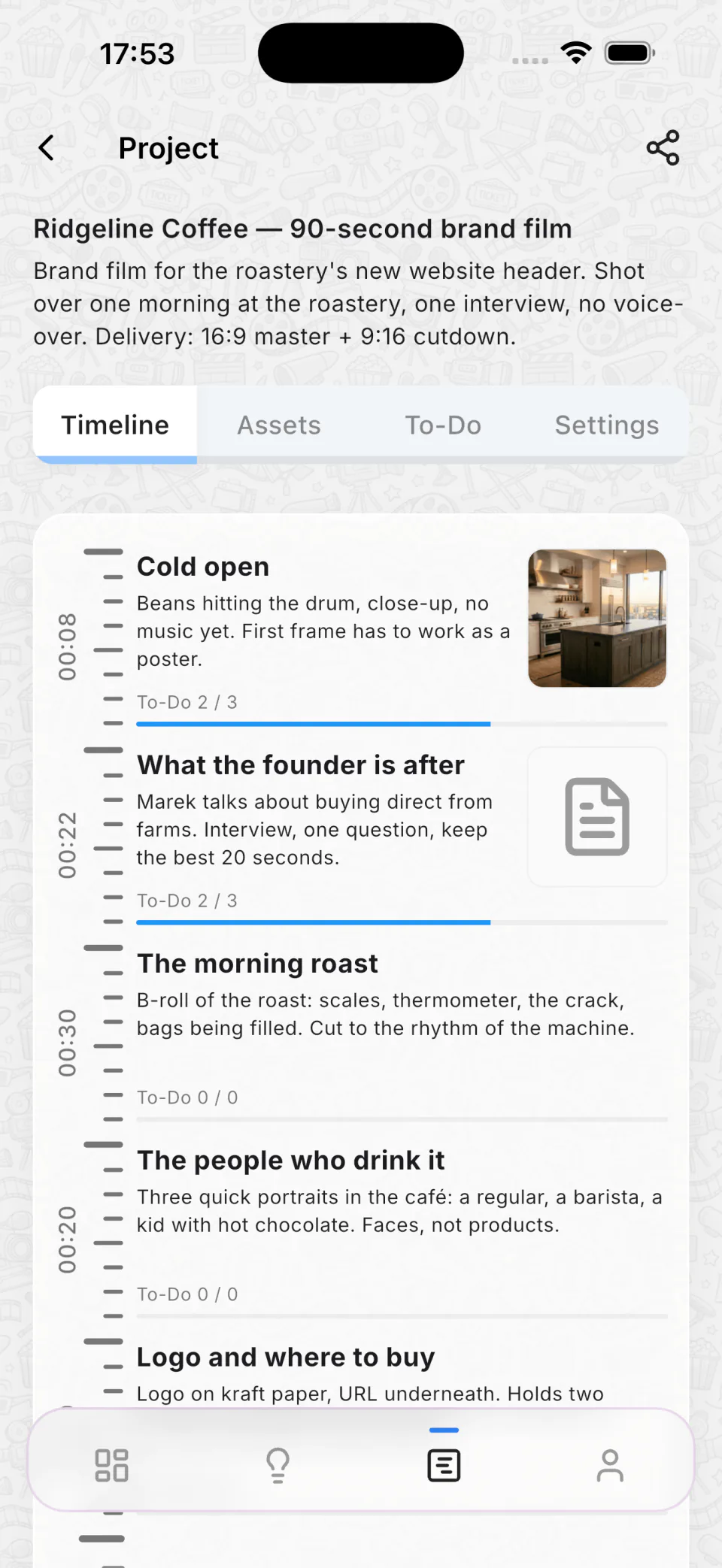
A project in Cutria: scenes on the timeline, each with its duration, script, attached footage and to-do progress

The script lives in one place. The video lives in five.

Today

  • Script in a doc, footage in a drive, notes in a chat.
  • The editor asks again what happens in scene four.
  • You explain the cut for longer than it takes to make it.

With Cutria

  • One timeline: scenes, durations, assets, checklists.
  • The editor opens the same plan you wrote.
  • Changes show up for everyone the moment you make them.

From a note on your phone to a sequence in your editor

The same project travels the whole way: you catch it on the phone, shape it on the desktop, and the editor opens it in the app they already use.

  1. 00:00

    Catch the idea

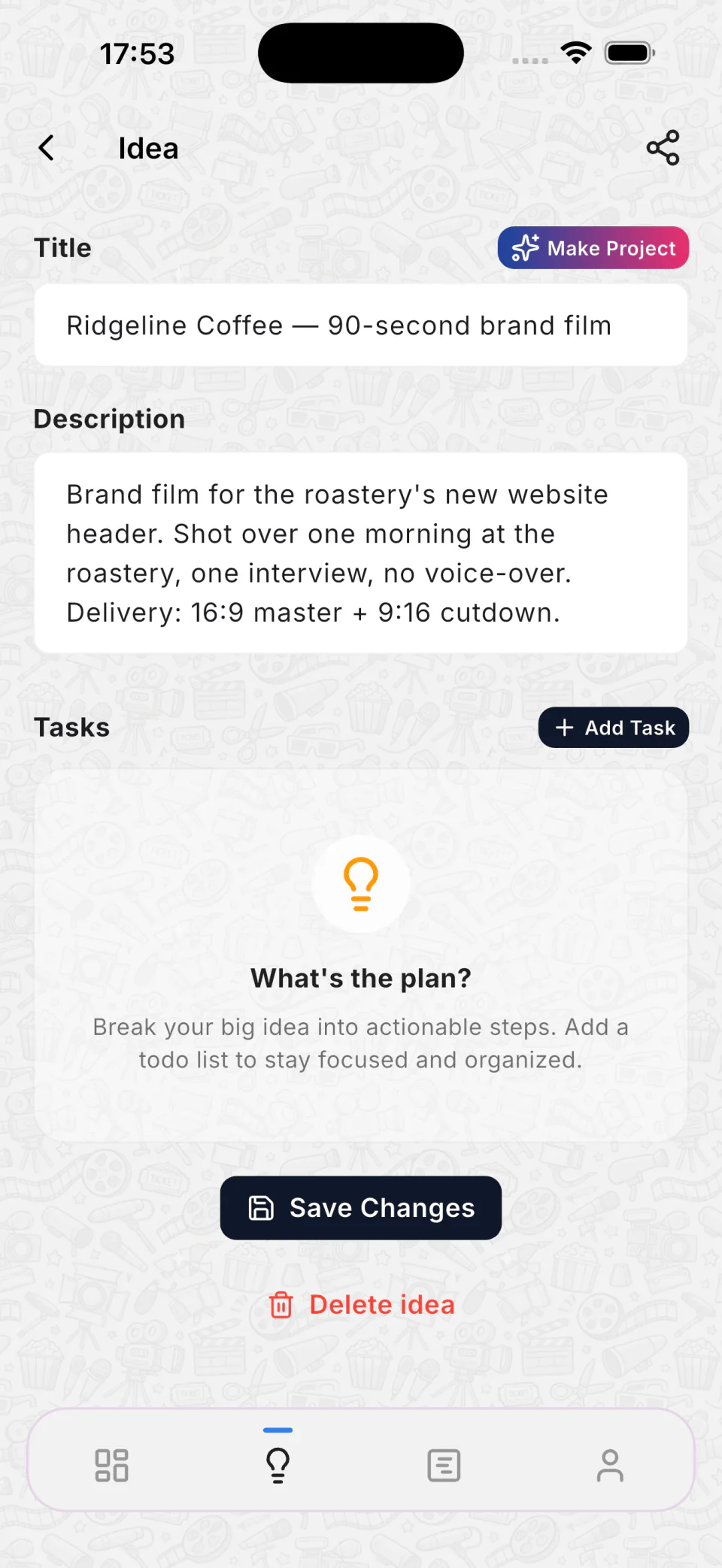
    Ideas are a stream you fill on the go — on the phone between shoots, with notes and to-do lists. They stay unlimited on every plan, including the free one.

    An idea on the phone: title, description and the button that turns it into a project
  2. 00:15

    Build the scenes

    An idea becomes a project: scenes on a vertical timeline, each with its duration, script, attached footage and a checklist of what still has to be shot.

    A project timeline on the phone: scenes with durations, attached footage and to-do progress
  3. 01:15

    Hand it over

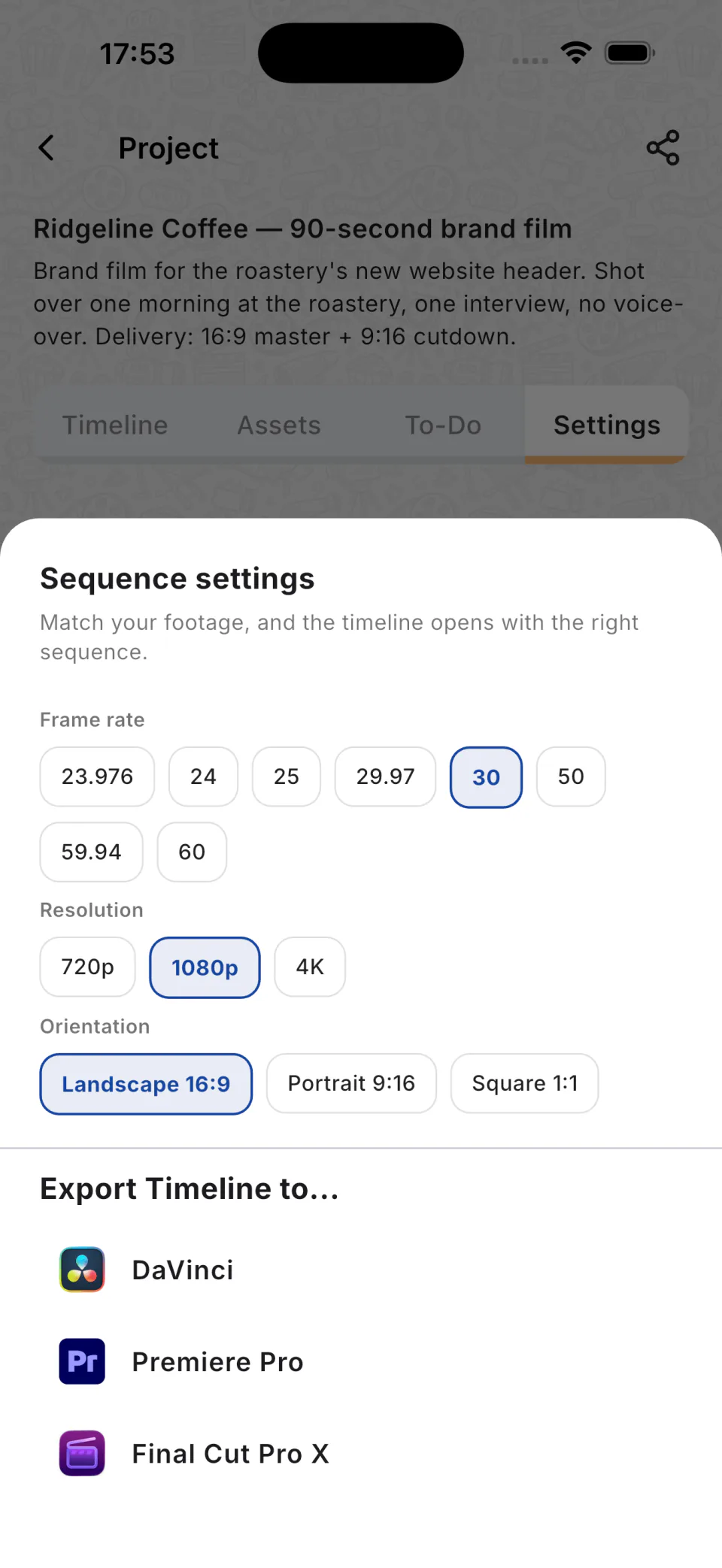
    Export to DaVinci Resolve, Premiere Pro or Final Cut — pick the frame rate, resolution and orientation first, so the sequence matches the footage.

    Sequence settings on the phone: frame rate, resolution and orientation, then the list of editors to export to

Built for a scriptwriter who was tired of sitting next to the editor

Cutria started by solving a real problem for a friend. He works as a scriptwriter at a marketing agency, and his biggest daily headache was communicating his vision to video editors and motion designers. They literally had to sit side-by-side for hours just to sync the script with the video timeline.

I built a simple web app for him to outline scenes and set approximate durations. It started as a basic vertical notepad. But soon, he asked for asset uploads, and then requested separate workspaces to manage different clients and teams. Once I saw how much time it saved his agency and how heavily they relied on it, I realized this was a widespread problem for all video creators. I decided to polish the app, build a proper architecture, and turn it into a full-fledged SaaS. That’s how Cutria was born.

Evgenii Plotnikov, founder
Your crew works from the same plan

Authors shape the story
They create and reorder scenes, set durations and rewrite the script. Everything they change reaches the rest of the team immediately.
Crew executes it
Editors, motion designers and assistants see scenes, footage and tasks, and tick off what’s done without touching the structure of the timeline.
A workspace per client
Keep every client or channel in its own space, with its own projects, footage and people.
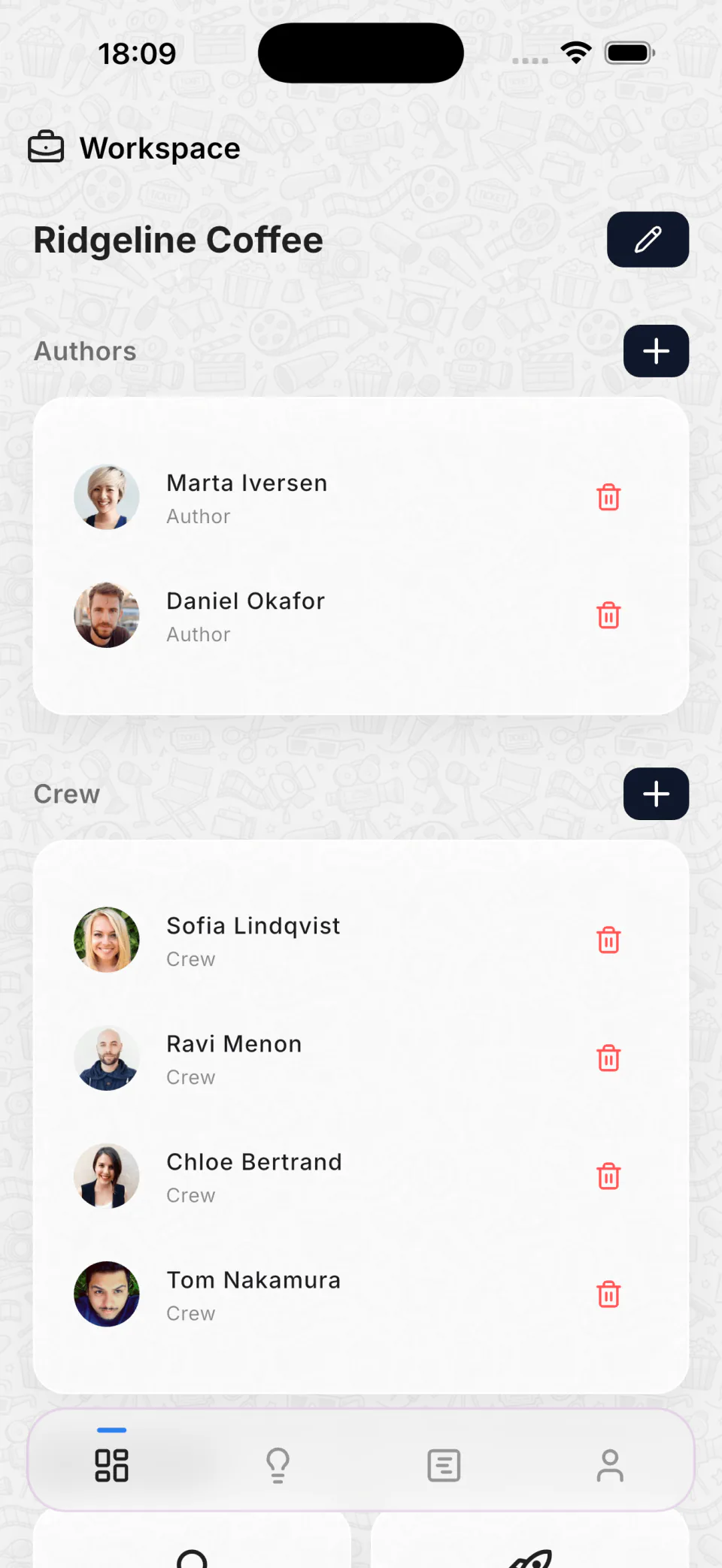
A shared workspace on a phone: two authors and four crew members with their roles

Four ways people run Cutria

Solo creator

You write, shoot and cut it yourself. A plan on the screen is what makes you set up the tripod instead of improvising.

Personal — free

Read the playbook

Creator with an editor

You hand the video over. The editor gets scenes with durations and footage attached, not a folder and a voice message.

Pro — $12/month

Read the playbook

Small team

A writer, an editor, a motion designer. One workspace keeps the version everyone works from up to date.

Team — $29/month

Read the playbook

Studio

Several clients, terabytes of raw footage, deadlines. Separate workspaces and one-click exports keep the pipeline moving.

Studio — $99/month

Read the playbook

Costs about an hour of an editor’s rate

Monthly, cancel any time. Prices in USD; on the web tax is added at checkout, App Store and Google Play prices already include local taxes.

Personal

Free

  • 1 active project
  • 1 workspace
  • 1 GB storage
  • Unlimited ideas
Start for free

Pro

$12 /month

  • 3 active projects
  • 1 workspace
  • 1 crew member
  • 5 GB storage
  • Unlimited ideas
Choose Pro

Team

Most picked

$29 /month

  • 9 active projects
  • 2 workspaces
  • 2 authors
  • 5 crew members
  • 25 GB storage
  • Unlimited ideas
Choose Team

Studio

$99 /month

  • Unlimited active projects
  • Unlimited workspaces
  • Unlimited authors
  • Unlimited crew members
  • 100 GB storage
  • Unlimited ideas
Choose Studio

More room for footage

A storage level adds to the storage that comes with your plan, and you can switch levels any time.

  • 100 GB $3.99/mo
  • 500 GB $12.99/mo
  • 1000 GB $21.99/mo
  • 3000 GB $59.99/mo
  • More Contact us

Web, iOS and Android — the same project everywhere

Catch ideas on the phone, plan on the desktop; everything syncs as you type.

Questions people ask first

Storage levels, subscriptions and prices by country are answered on the full FAQ page.

Which editors can I export to?

DaVinci Resolve and Premiere Pro take the XML, Final Cut Pro X takes FCPXML. Before exporting you pick the frame rate (23.976 to 60, including NTSC 29.97 and 59.94), the resolution (720p, 1080p, 4K) and the orientation (16:9, 9:16, 1:1), so the sequence matches your footage. The choice is remembered per project.

What happens to my files if I stop paying?

The account returns to the free Personal plan. Anything that does not fit into it is removed for good: team workspaces are deleted, projects are archived into your personal workspace, and uploaded media is deleted. We send a warning email before that happens, so export what you need while the plan is still active.

What can my editor see and change?

Crew members work inside the project: they see scenes, the script, footage and tasks, and tick off what is done, but they do not change the structure of the timeline. Authors own the structure — they add, reorder and retime scenes. Both see updates immediately.

How do project slots work?

A slot is one active project. On Pro there are 3, so you can write one video, gather references for another and shoot a third at the same time. Archive a finished video and the slot is free again; archived projects and their files stay while your plan is active.

Are there file size limits?

No limit on a single file — only the total storage of your plan plus any storage level you bought. Large files upload in parts, and an upload can be stopped and resumed.

Plan the next video instead of explaining it

Start on the free plan: unlimited ideas, one active project, your own workspace.